When attorneys talk about email evidence, they usually mean the words on the screen: what was said, by whom, to whom. That visible text is important. But beneath it sits a second layer of information that courts increasingly rely on, and that opposing counsel increasingly exploits.
Email metadata. It's not glamorous. Most attorneys have a vague sense it exists, a firm belief that their IT department handles it, and limited patience for the details. That approach is defensible in transactional work. In litigation, it is a liability.
This guide covers what email metadata actually is, why it matters in discovery and trial, how it can be used against your client (or for them), and what practical steps small firm attorneys need to take to handle it properly.
What Email Metadata Actually Is
Metadata is data about data. In the context of email, it refers to the technical information attached to every message that is not part of the visible body text.
Some of it is familiar. The "From," "To," "CC," and "Subject" fields you see in your email client are technically metadata, in the sense that they describe the message rather than constitute it. But those are just the surface.
The more consequential metadata is in the email's full headers, a block of technical information that most email clients hide by default. A full email header typically includes:
Message-ID. A unique identifier assigned to each email when it is sent. This allows forensic analysts to distinguish between different versions of an email (originals versus forwards) and to detect fabrication.
Timestamps. Multiple timestamps, not one. There's the "Date" field (when the sender's mail client recorded the message), the server-received timestamp (when the recipient's mail server received it), and often intermediate timestamps from mail relay servers along the route. These rarely match perfectly, and the discrepancies sometimes matter.
Routing information. The "Received" headers trace the path the email took from sender to recipient, server by server. This shows which mail servers processed the message, in what order, and at what times.
User-Agent string. The email client software used to compose the message (e.g., "Microsoft Outlook 16.0.14701.20226 for Windows"). This can be used to verify whether a claimed email was plausibly composed on the device the sender says they used.
Read receipts and delivery receipts. When enabled, these generate metadata entries showing when a message was delivered and when it was opened.
DKIM signatures. DomainKeys Identified Mail is a cryptographic signature added by the sending mail server to verify that the email was sent from the claimed domain and was not altered in transit. A valid DKIM signature is strong evidence of authenticity. A missing or invalid one is worth examining.
Why It Matters in Discovery
Authenticating Email Evidence
Under Federal Rule of Evidence 901, email must be authenticated before it is admitted. The proponent must produce "evidence sufficient to support a finding that the item is what the proponent claims it is."
For email, that used to mean a live witness (someone who sent or received the email) or a certification under FRE 902(13) or (14). Metadata adds a third avenue: technical authentication.
A valid DKIM signature, consistent routing headers, and a Message-ID traceable to the claimed mail server can authenticate an email without a witness. Conversely, metadata inconsistencies (a "Date" field that does not match the server receipt timestamp, routing headers that suggest the email never passed through the claimed server, a DKIM signature that fails verification) can raise serious questions about authenticity.
Courts have excluded email evidence where metadata was stripped or inconsistent. They have also allowed otherwise questionable emails when metadata supported authenticity. For attorneys on either side, understanding what the metadata shows is not optional.
Catching Altered or Fabricated Email
Email forgery is more common in litigation than most practitioners assume. It ranges from the crude (a screenshot that has been edited) to the sophisticated (a message sent from a cloned domain with a spoofed header).
Metadata is the primary forensic tool for detecting alteration. Common indicators:
Timestamp inconsistencies. If the "Date" header shows 9:00 AM Eastern and the receiving server's timestamp shows 2:00 PM UTC (which would be 9:00 AM Eastern), everything is consistent. If the "Date" shows 9:00 AM Eastern and the server received it at 9:47 AM UTC (4:47 AM Eastern), someone has some explaining to do.
Missing routing headers. Every legitimate email passes through at least one mail server and carries "Received" headers to show it. An email with no "Received" headers, or headers that show an impossible routing path, is suspicious.
DKIM signature failures. A DKIM signature that fails verification on a corporate email account means either the email was altered after it was sent, or it was never sent from that domain at all.
Message-ID format mismatches. Message-IDs follow format conventions specific to email client software. An email allegedly sent from Gmail with a Message-ID in the format used by Microsoft Exchange is worth examining carefully.
For small firm attorneys, this does not require becoming a forensic expert. It requires knowing when to engage one.
Establishing or Attacking the Timeline
In contract disputes, employment matters, and fraud cases, timing is often everything. Metadata provides a granular, contemporaneous record that witness testimony cannot replicate.
Consider a scenario: your client's counterparty claims they never received a critical email with an attached deadline notice. The "Date" field of the email says it was sent on Tuesday afternoon. The routing headers show it was received by the counterparty's mail server at 3:47 PM that same day. A delivery receipt shows the message reached the recipient's inbox. Three pieces of metadata, none visible in the email body, that collectively make the "I never got it" argument untenable.
Or the reverse: the other side produces an email they claim your client sent on March 15th, but the metadata shows the message was composed in a version of Outlook that was not released until April. That is a fabrication problem for them.
Read Receipts in Employment Cases
In employment litigation, a recurring dispute is whether an employee was notified of a policy, warned about performance issues, or informed of a decision. HR departments often send notification emails with read receipts enabled.
Read receipt metadata, when it exists, can settle these disputes. When it does not exist (because read receipts were not enabled, or because the recipient declined to send one), that absence becomes part of the factual record. Attorneys on both sides need to know what was tracked and what was not.
What Gets Lost When You Handle Email Wrong
Metadata is fragile. Several common practices destroy it entirely, often without anyone realizing it until much later.
Forwarding. When an email is forwarded, the visible content is generally preserved, but the original metadata is not. The "Date" field of a forwarded message reflects the time of the forward, not the original send. The routing headers show only the forward's path. The original Message-ID may be embedded in the body, but it is not in the header where forensic analysis can easily reach it.
Printing to PDF. A printed PDF of an email shows the visible content. Nothing else. Metadata is gone entirely.
Screenshots. Same problem, compounded by the possibility of image editing.
Copy-paste into Word. You've already guessed it.
Third-party exports without metadata preservation. Some email management tools and discovery platforms strip metadata during export. Know what your tool preserves before you rely on it.
The implication for litigation is direct: if you or your client have been handling email by forwarding, printing, or screenshotting, the metadata you need may no longer exist in the materials you have. The original source inbox may be the only place it is recoverable.
This is one of the core reasons why collecting email evidence from the original mailbox via IMAP access is the correct practice, and why collecting via forwarded copies is not.
The Producing Party's Obligations
Under FRCP 34(b)(2)(E), a producing party must produce ESI either in the form it is ordinarily maintained, or in a reasonably usable form. For email, "the form it is ordinarily maintained" includes metadata. Courts have held that producing email as static PDFs without metadata, when the requesting party has asked for native format or metadata, is non-compliant.
If you receive an ESI request and produce stripped PDFs, you may face a motion to compel, sanctions, or both. The safer practice: understand what format has been requested, understand what your collection method preserves, and confirm that what you produce matches the obligation.
For the requesting party, if you want metadata, ask for it explicitly in your discovery requests. Specify native format or specify that you expect full metadata fields including headers. Courts are more sympathetic to requesting parties who asked for metadata and did not get it than to those who accepted stripped PDFs without objecting.
Practical Steps for Small Firm Attorneys
Get the hold out before anything is forwarded or deleted. The litigation hold notice to your client should specifically address email, should instruct them not to forward emails as a substitute for preservation, and should tell them not to allow IT to run any export process that strips metadata. This sounds obvious. It is frequently ignored.
Collect from the source inbox. When you are building an email record for discovery, connect to the original mailbox directly via IMAP. This preserves full headers, routing information, and all metadata fields. Document the access: when you connected, to which account, and what scope you searched. This documentation supports chain-of-custody arguments later.
Preserve in native format first, convert to PDF later. The native .eml or .msg file contains the full metadata. Convert to PDF for presentation and sharing, but retain the native files. If metadata questions arise later, you have the source.
Know when to get a forensic expert. If you suspect email fabrication, if metadata inconsistencies appear in your opponent's production, or if you are preparing to challenge the authenticity of email evidence, a digital forensics expert is worth the cost. They can perform analysis that you cannot do from an email client, and their testimony on metadata carries weight that lay testimony about "what the email says" does not.
Request metadata explicitly in discovery. If email communications are central to your case, do not accept a production that strips headers. Request native format, or specify in your production protocol that full metadata fields must be preserved and produced.
A Note on Email Chronologies and Metadata
When building an email chronology for court use, the timestamps displayed should come from the metadata, not from what your email client shows on screen. Email clients often reformat timestamps into local time, drop timezone information, or display only the "Date" header rather than the more precise server-received timestamp.
A court-ready chronology that uses wall-clock display times without specifying timezone is an invitation for dispute. A chronology that captures the full timestamp with timezone, drawn directly from the email header, is much harder to challenge.
ThreadLine generates email timelines directly from IMAP access to the source mailbox, capturing full header metadata including timestamps, routing information, sender and recipient data, and subject lines. The output is a clean, court-ready chronological PDF or a secure shareable link. All email data is encrypted with AES-256 before storage. Shared links expire automatically. No email content is stored in plaintext.
If you're preparing an email chronology for litigation and want the metadata done right, start with a free timeline at threadline.app. No credit card required.
The Summary
Email metadata is the technical record underneath what you see on screen: timestamps, routing paths, cryptographic signatures, client identifiers, read receipts. In litigation, it authenticates evidence, exposes fabrication, and establishes timelines that witness testimony cannot replicate.
Small firm attorneys do not need to become forensic analysts. They do need to preserve metadata from the start (by collecting from original inboxes, not from forwarded copies), produce it properly when required, request it when opposing counsel owes it to them, and know when the metadata questions in a case warrant expert help.
The attorneys who handle this well tend to be the ones who thought about it before the motion to compel, not during it.
FAQ
What is email metadata?
Email metadata is the technical and contextual information around a message, including sender, recipient, timestamps, message ID, routing headers, attachments, and sometimes read or delivery data.
Why does email metadata matter in litigation?
Metadata helps authenticate messages, resolve timing disputes, connect attachments, identify custodians, and test whether a message was altered or taken out of context.
Can screenshots preserve email metadata?
No. Screenshots may show visible content, but they usually omit headers, message IDs, full timestamps, routing details, and attachment relationships.
Related reading
- Outlook email evidence guide
- Email chain of custody
- Admissibility of email evidence
- Document landlord dispute emails
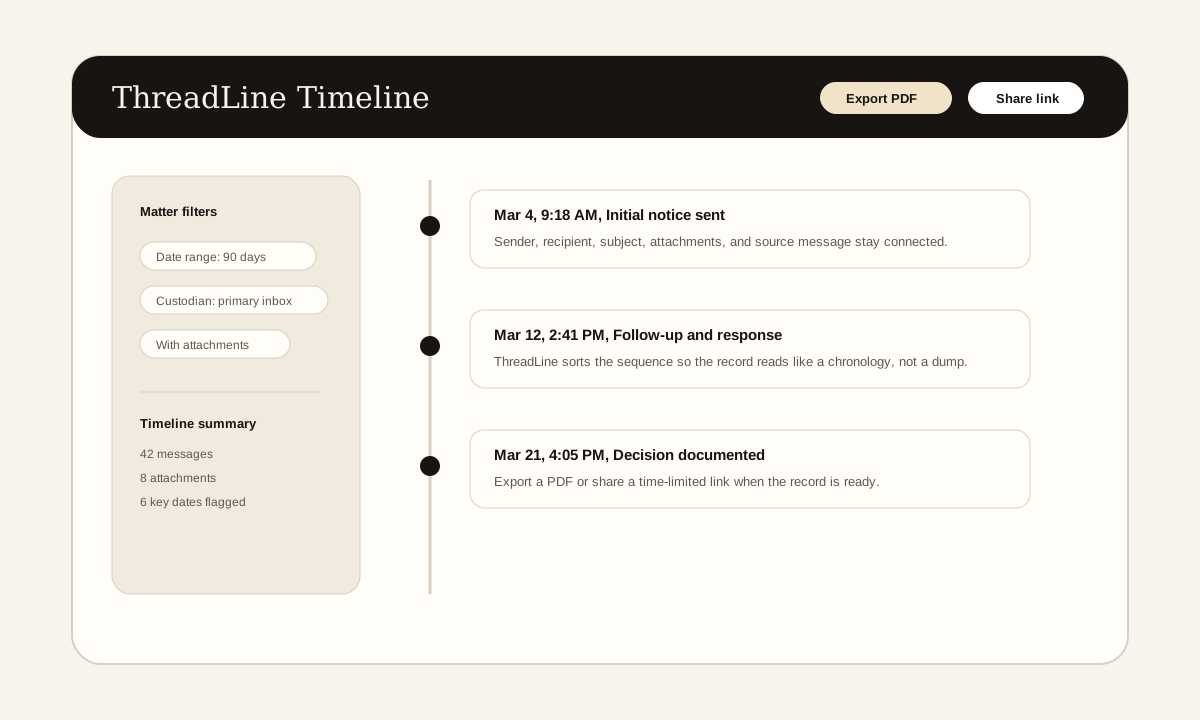
The screenshot above is a product example of the timeline view these articles describe: messages in order, source context preserved, and export or sharing controls available when the record is ready.
Need a clean email record without enterprise pricing?
ThreadLine gives small firms a court-ready email timeline in minutes. No Relativity, no per-gigabyte fees, just a clear, chronological record you can share or export. First timeline is free.
Working an active case? A $49 Case Pass covers 90 days with no subscription.
Need to organize the record first? Get the free dispute documentation checklist.
← Back to all posts