Most email evidence problems are not novel. They are the same five or six mistakes, repeated across thousands of cases, by firms of every size. The good news is that predictable mistakes have predictable solutions. The bad news is that by the time you find out you made one, the other side has already filed the motion.
This post is about producing email evidence in discovery: what goes wrong, why it goes wrong, and how to fix it before the production goes out the door.
Why Email Productions Fail
Email is deceptively simple to collect and deceptively complex to produce correctly. A lawyer can export a folder of emails in thirty seconds. Whether that export preserves the right metadata, uses the right format, includes the right attachments, and covers the right custodians is a different question entirely.
Courts have made clear that parties are responsible for understanding the requirements and producing accordingly. Saying you did not know the native format requirement or the metadata field request is not a winning argument. So here are the five mistakes to know before they become your problem.
Mistake 1: Producing PDFs Instead of Native Format (or Proper TIFF with Load Files)
This is the most common technical mistake small firms make. Someone exports a batch of emails, saves them as PDFs or prints them to a PDF printer, and sends them over. Clean, readable, easy. Also wrong.
When opposing counsel requests "native format" production, or when a court order specifies ESI production standards, a PDF is not native format. A native email file is the actual file as it existed in the mail system: an .eml file, an .msg file from Outlook, or a PST/MBOX archive. PDFs strip most of the metadata that makes email evidence useful and defensible, including message headers, send timestamps in their original form, routing data, and threading information.
The alternative to native is typically TIFF images with load files: a DAT file containing metadata and an OPT file containing image references. This is a more complex production format, but it is the accepted standard in most major litigation platforms.
What to do: Review the agreed-upon ESI protocol or the court's discovery order before the production goes out. If there is no order, confer with opposing counsel. Default to native format unless there is a specific reason not to. If you must produce TIFFs, generate proper load files or use a vendor who can.
Mistake 2: Stripping or Losing Metadata
Metadata is the data about the data. For emails, this includes the sent timestamp, received timestamp, sender address, recipient addresses (To, CC, BCC), routing headers, message ID, and in some systems, read receipts and flag status. None of this appears in the body of a printed email. All of it can matter in court.
BCC fields are a classic example. An email printed to PDF shows To and CC recipients. It does not show BCC recipients. In litigation over what a party knew and when, or who was actually on a communication, the BCC field can be the entire case. Strip it out of a production and you may have committed inadvertent spoliation, or handed the other side an argument that you did.
Metadata loss happens in several ways: printing to PDF, copying emails into Word documents, forwarding chains that strip headers, and some export tools that do not capture all fields by default.
What to do: Use a proper collection tool rather than manual export. If you are collecting from Microsoft 365 or Outlook, use the Compliance Center or a third-party tool that captures metadata fields. Verify the output against the original before producing. Do not forward emails to yourself as a collection method.
Mistake 3: Missing Attachments or Producing Them Separately Without Linking
An email and its attachments are a family. They should stay together in production. When they do not, the production becomes difficult to use and easier to challenge.
The problem shows up in two ways. First, the attachment is missing entirely, either because the export tool did not capture it or because someone manually selected only email messages. Second, the attachment is produced but with a different Bates number range, no reference back to the parent email, and no indication which document it belongs to. Now the other side has to manually reconstruct which contract or spreadsheet went with which email. Courts do not look favorably on productions that require that kind of remedial work.
In a proper production, each email's metadata record includes a field identifying its attachments, and each attachment's record references its parent email. This is standard in any proper load file but completely absent from a folder of PDFs.
What to do: Confirm your collection and processing workflow maintains parent-child relationships. If you are using a litigation platform like Relativity, Everlaw, or even a smaller tool, verify the attachment linking before producing. If producing natives, produce the parent email and all attachments as a cohesive set.
Mistake 4: Incomplete Custodian Coverage
Discovery requests define the scope of what must be produced. But even lawyers who understand scope sometimes undercount the number of people whose email must be collected.
The obvious custodians get collected: the named parties, the key executives, the HR representative. The non-obvious ones are where things fall apart. The assistant who handled scheduling. The outside consultant with a company email account. The former employee whose account was not properly archived before they left. The employee who conducted business on a personal Gmail account.
Custodian gaps come up in depositions. When a witness describes email communications that should exist but were not produced, the explanation "we did not collect that person's email" is a bad one. At best it means an additional production round. At worst it raises questions about what else was not collected.
What to do: Do not draft your custodian list in isolation. Ask your client: who else was involved in this decision, project, or communication chain? Who would have been copied on relevant emails? Did anyone use a personal account for work purposes? Were there outside vendors or consultants with access to company systems? Document your custodian analysis. If you later need to explain your collection decisions, having a written record of who was considered and why is the difference between a defensible process and an avoidable sanctions motion.
Mistake 5: Not Reviewing the Production Before It Goes Out
This sounds obvious. It is still routinely skipped.
A pre-production quality check catches the problems listed above before opposing counsel finds them. It also catches confidentiality issues: privileged documents that slipped through the review, third-party personal information that should be redacted, trade secrets that are responsive but sensitive.
The alternative is clawback litigation. Most ESI orders include clawback provisions under Federal Rule of Evidence 502(d), which let you claw back inadvertently produced privileged material. But clawback is expensive, time-consuming, and embarrassing. And it only works for privilege. If you produce a document containing a non-party's medical history that you should have redacted, clawback does not undo the exposure.
A production review should check: that the volume looks right relative to your collection log, that no obviously privileged documents are present, that metadata fields are populated, that attachments are linked, and that the format matches what was agreed upon.
What to do: Build a checklist and use it. Treat the production review as a mandatory step, not an optional one. If the volume is large enough that a full review is impractical, do a statistically valid sample review and document it. At minimum, spot-check the most sensitive custodians.
The Underlying Problem: Email Is Hard to Organize
Most of these mistakes share a root cause. Email evidence is hard to organize, especially when you are pulling from multiple custodians across a long time period. Threading is inconsistent. Duplicate messages accumulate. Attachments scatter. The same conversation can appear in five different people's inboxes in slightly different forms.
Without a systematic approach to collection, review, and production, errors compound. The fix is not just knowing what mistakes to avoid. It is having a process that makes the right thing the easy thing.
A More Defensible Way to Handle Email Evidence
ThreadLine turns email threads into clean, chronological timelines organized by conversation and custodian. Instead of manually reconstructing who said what and when across hundreds of messages, you get a structured record that is easier to review, easier to verify, and easier to produce. If producing email evidence is part of your practice, it is worth a look.
FAQ
What is the most common email evidence production mistake?
The most common mistake is producing convenient PDFs or screenshots without preserving the original messages, metadata, thread context, and attachments.
Why do attachments cause production problems?
Attachments can be separated from the message that sent them, renamed, missed, or produced without context, which makes the record harder to authenticate and review.
How can a firm reduce email production risk?
Use a consistent collection workflow, preserve source records, track custodians, keep attachments connected, review before production, and document production format decisions.
Related reading
- Email subpoena response guide
- Email metadata in litigation
- What is a custodian in eDiscovery?
- Court-ready email exhibits
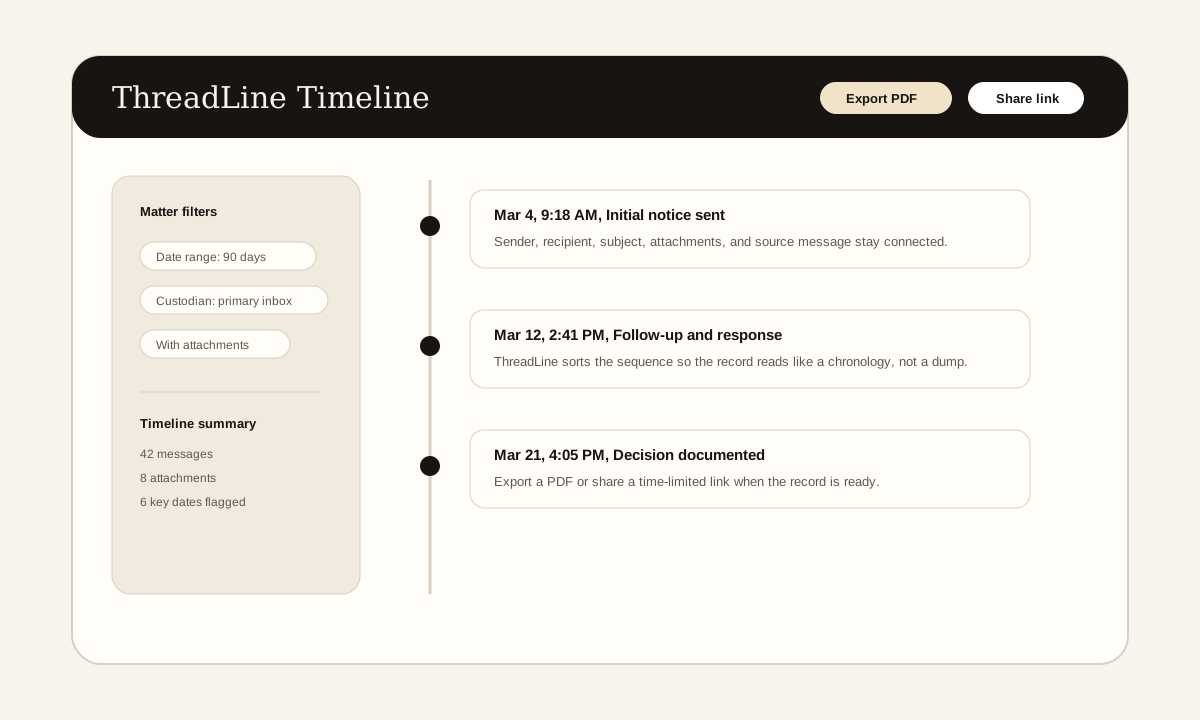
The screenshot above is a product example of the timeline view these articles describe: messages in order, source context preserved, and export or sharing controls available when the record is ready.
Need a clean email record without enterprise pricing?
ThreadLine gives small firms a court-ready email timeline in minutes. No Relativity, no per-gigabyte fees, just a clear, chronological record you can share or export. First timeline is free.
Working an active case? A $49 Case Pass covers 90 days with no subscription.
Need to organize the record first? Get the free dispute documentation checklist.
← Back to all posts