Email evidence shapes the outcome of more cases than most attorneys care to admit. A single timestamp, a reply that was never sent, a forwarded thread that contradicts the client's account: email is often the most complete record of what actually happened, and courts know it.
That's why email chronologies have become a standard deliverable in discovery, depositions, and trial prep. And that's also why building them manually is one of the most painful, time-consuming tasks in a small firm's workflow.
This guide covers what a proper email chronology looks like, when you need one, best practices for making it defensible, and how to build one without spending two days in someone's inbox.
What Is an Email Chronology?
An email chronology (sometimes called an email timeline or email log) is a structured, chronological record of email communications relevant to a legal matter. It typically includes:
- Date and time of each email (including timezone)
- Sender and all recipients: full names and email addresses
- Subject line
- Summary or full body of the message
- Thread context: which emails are replies or forwards of which
- Attachments (noted, and sometimes included separately)
The goal is to give attorneys, paralegals, judges, or opposing counsel a clear picture of who said what, when, and in what order, without requiring them to dig through a chaotic mix of forwarded threads and exported .eml files.
When Do You Need an Email Chronology?
Discovery Requests
When opposing counsel requests "all communications related to [matter X]," producing a disorganized pile of forwarded emails is not a good look and can invite sanctions. A clean, court-ready chronology demonstrates that the production is complete and organized.
Deposition Preparation
Preparing a witness for deposition requires understanding the full timeline of what they communicated, to whom, and when. An email chronology lets counsel quickly identify inconsistencies before opposing counsel does.
Hearings and Trial Prep
When email threads will be introduced as exhibits, judges and juries need to understand the sequence of events. A chronological summary, particularly one that collapses a 200-email thread into a readable narrative, can be far more effective than raw email prints.
Internal Investigations and HR Matters
Employment disputes, whistleblower complaints, and compliance investigations all require reconstructing email history. The same principles apply: completeness, accuracy, and a defensible audit trail.
Client Disputes and Fee Agreements
When a client claims they were never told something, or disputes the scope of representation, the email record is usually the deciding factor. A chronology makes this easy to present and hard to dispute.
What Makes an Email Chronology Defensible?
A chronology is only as good as its credibility. Here's what separates a defensible record from one that opposing counsel can attack:
Completeness
Cherry-picking emails that help your client while omitting inconvenient ones is both ethically problematic and legally dangerous. A defensible chronology includes all responsive communications within the defined scope, including the ones you would rather not see.
Metadata Integrity
The date, time, sender, and recipient data should come directly from the email's metadata, not from what's displayed in a forwarded message. Forwarded emails often truncate headers, modify timestamps, or strip important context. When possible, work from the original source inbox.
Chain of Custody
Can you demonstrate that the emails were pulled directly from the relevant account without modification? If a client provides printed emails or screenshots, you have a chain-of-custody problem. Working directly with the email account (via IMAP access, for instance) produces a more defensible record.
Consistent Format
Courts and opposing counsel expect consistent formatting. Mixing screenshots, PDFs, and Word documents in the same production creates confusion. A single, consistently formatted PDF chronology is always the stronger choice.
Confidentiality Controls
Sensitive email records, especially those involving privileged communications, PII, or trade secrets, need to be handled carefully. Forwarding entire inboxes to external tools, sharing spreadsheets over email, or using consumer cloud storage all create exposure.
The Traditional Process (and Why It Hurts)
Here's how most small firms build an email chronology today:
- Request access to the relevant email account(s): client credentials, forwarded exports, or a PST file
- Search manually for relevant parties, date ranges, and keywords
- Export or copy relevant emails into a Word document or spreadsheet
- Sort chronologically (which sounds simple until you have 400 emails across three accounts)
- Format for court: consistent headers, readable layout, page numbers
- Review for completeness: did you miss anything? Did the client forward everything?
- Share for review: email it around and hope nobody opens the wrong attachment
For a mid-sized matter, this process routinely takes one to three full days of paralegal time. At $30–50/hour, that's $240–$1,200 of billable cost on top of the actual legal work. And that is assuming nothing goes wrong.
The costs compound across matters. A firm handling ten litigated matters a year might spend 20–30 paralegal days annually on email chronologies alone.
Best Practices for Building Email Chronologies
Whether you're doing this manually or with a tool, these practices apply:
Define the scope precisely before you start. Who are the relevant parties? What date range? What keywords? Scope creep is the enemy of efficiency. A well-defined scope also makes your production easier to justify if challenged.
Work from the source inbox when possible. Direct IMAP access to the email account is the gold standard. It gives you access to complete headers, preserves metadata, and creates a cleaner chain of custody than client-provided exports.
Preserve rather than summarize for key emails. For emails likely to become exhibits, include the full text. For contextual emails, a one-sentence summary may suffice. Make this choice deliberately, not based on how much time you have.
Date-stamp everything at the document level. Your chronology itself should have a creation date and a clear description of the scope and sources. This matters if the document is later questioned.
Use PDF for court submissions. It's the most universally accepted format, preserves formatting across devices, and can be Bates-stamped if needed.
Build in a review step. Have a second set of eyes confirm that the chronology covers the defined scope and that no significant emails were missed. This is especially important when working from a client-provided export.
A Faster Way: ThreadLine
For law firms looking to eliminate the manual labor, ThreadLine was built specifically for this workflow.
You connect your email account (or your client's, with their credentials) via IMAP (Outlook, Microsoft 365, Gmail, and any standards-compliant email provider all work). You specify the relevant parties, date range, and keywords. ThreadLine processes the mailbox and generates a complete chronological timeline, which you can:
- Export as a court-ready PDF with full metadata, sorted chronologically
- Share via a secure, time-limited link that you can revoke at any time
- Review and refine before sharing with opposing counsel or the court
All email data is encrypted with AES-256 before storage. ThreadLine never stores plaintext email content. Shared links expire automatically. It was designed from the ground up for professionals handling confidential communications.
A process that typically takes 1–3 days takes 10–20 minutes.
The Pro plan is $9/month, less than a single hour of paralegal time. Your first timeline is free, no credit card required.
Try it with your own email at threadline.app →
Summary
Email chronologies are a standard and often critical deliverable in modern litigation. The manual process of building them is expensive, error-prone, and time-consuming. It is a poor use of paralegal time that could go toward higher-value work.
A defensible email chronology starts from the source inbox, preserves metadata, defines scope clearly, and produces a consistent, court-ready format. Whether you're building one manually or with a tool like ThreadLine, the principles are the same: completeness, accuracy, and a clear chain of custody.
If you'd like to see what a ThreadLine-generated timeline looks like before connecting your own account, the interactive demo at threadline.app/demo walks through a realistic example in minutes.
FAQ
What is an email chronology for court?
An email chronology for court is a chronological record of relevant messages that shows dates, senders, recipients, subjects, attachments, and the factual significance of each communication.
How is an email chronology different from an email chain?
An email chain is one conversation thread. An email chronology organizes many threads and messages into one dated timeline that explains the larger dispute.
Can individuals use an email chronology outside litigation?
Yes. A chronology can help individuals explain custody, landlord, workplace, and contract disputes before a hearing, mediation, attorney consultation, or formal case filing.
Related reading
- Court-ready email exhibits
- How to organize email evidence
- Organize emails for a custody case
- Document landlord dispute emails
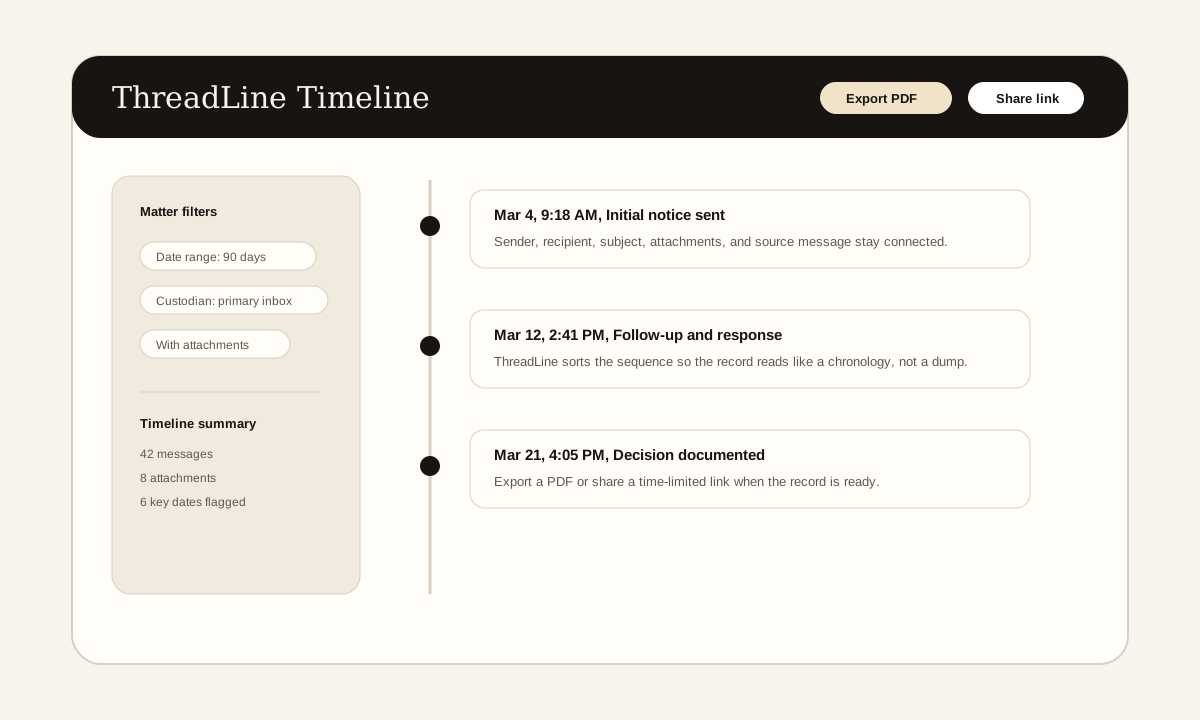
The screenshot above is a product example of the timeline view these articles describe: messages in order, source context preserved, and export or sharing controls available when the record is ready.
Need a clean email record without enterprise pricing?
ThreadLine gives small firms a court-ready email timeline in minutes. No Relativity, no per-gigabyte fees, just a clear, chronological record you can share or export. First timeline is free.
Working an active case? A $49 Case Pass covers 90 days with no subscription.
Need to organize the record first? Get the free dispute documentation checklist.
← Back to all posts